How to deposit in Web version
To make a deposit you should be registered in the website first. By entering username
and password you will enter your account. Touch “Cashier” then “Deposit” and choose a
payment method.

As you can see in the following image, the aproximate time and transaction expense for each
deposit method has been shown. Please consider the minimum and maximum amount of a deposit.

-
Buying digital currency from exchanger:
In this method you may transfer money to an online exchanger simply
by making a bank transaction. By providing our web money or perfect
money account you may purchase the currency for our account. You
should fill “E-money Transfer” form and place the batch number or
order number (or batch number) in “Customer Notes” field.
In the following we provide you the Information you may need for buying digital currency:
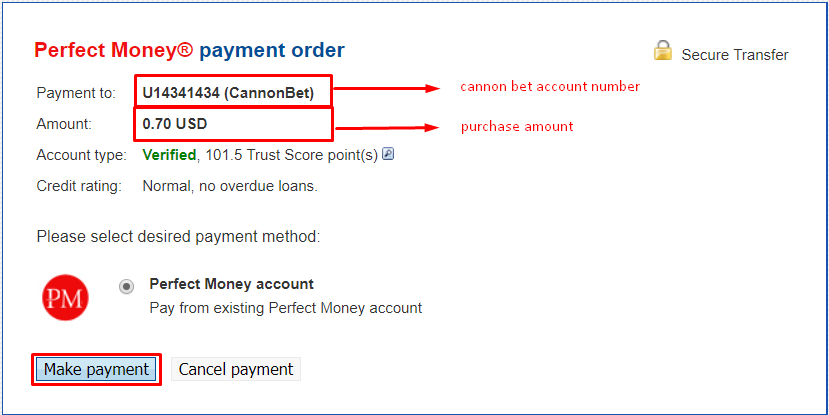
Cannonbet Perfect money account number (for presenting to exchanger): U14341434
Cannonbet Web money account number (for presenting to exchanger):

Please remember to enter the purchase amount according to your account currency.
- Buying Perfect Money Voucher or Webmoney Paymer:
In this method you should provide the Webmoney card number
to our support team and your account will be immediately recharged.
In case of Perfect money, you have to enter the voucher codes as
it is explained in the following, and your account will be recharged
automatically with the same amount. Please note that the mentioned
codes may be provided to different individuals by the exchangers.
Therefore, as soon as you purchase the currency please enter the
codes in the specified fields.
You may find many online exchangers by searching internet.
Some examples are as the following:
www.farhadexchange.com
www.exchanging.ir
www.pm4ir.com
www.iranianex.com
www.paybycashu.com (for purchasing card)
www.nasimrayaneh.com
Depositing with personal Webmoney account:
If you have a personal Webmoney account, you can simply transfer an
amount to the following account and recharge your Cannonbet account:
Cannonbet Webmoney account:
You should transfer the desired amount and inform our support team so
that they would recharge your account.
Depositing from Perfect Money Voucher:
In this method according to the following image you would open perfect
money field then then fill in the voucher number and activation code:

Your account will be recharged automatically.
Depositing from Personal Perfect Money:
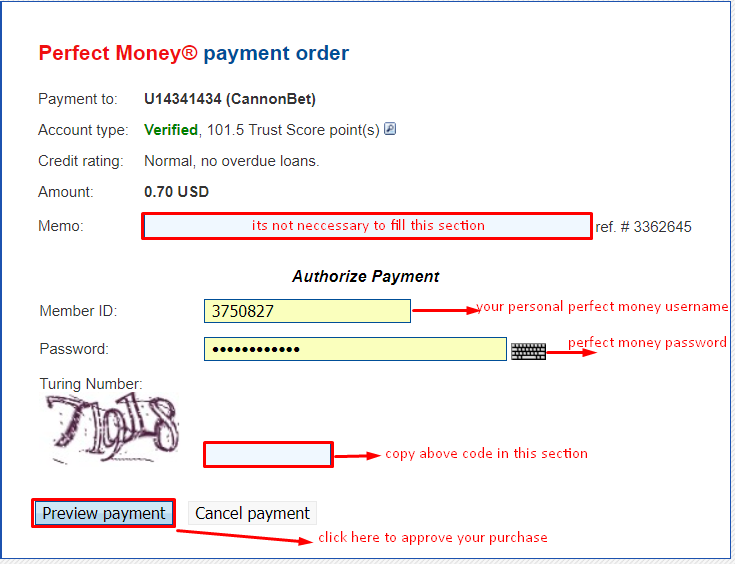
As the following image you should enter Perfect Money e-Wallet and enter
the desired amount and choose deposit checkbox.

Cannonbet perfect money account: 14341434
After completing your purchase your account will be recharged automatically.